Project Overview
While students experience the mock test, administrators across universities and Mock test organization must handle mock test application, test question management, grading for test-takers, and even more.
I led the UX design for the admin ecosystem, building a structured platform for four distinct
Challenge
The admin page was designed for four different user roles —university administrators, organizers, question creators, and graders— all operating within the same system.
This multi-layered structure made the overall architecture highly complex, so the primary challenge was to create an interface that feels intuitive and seamlessly connected across roles.
Ideate
Workflow Diagram
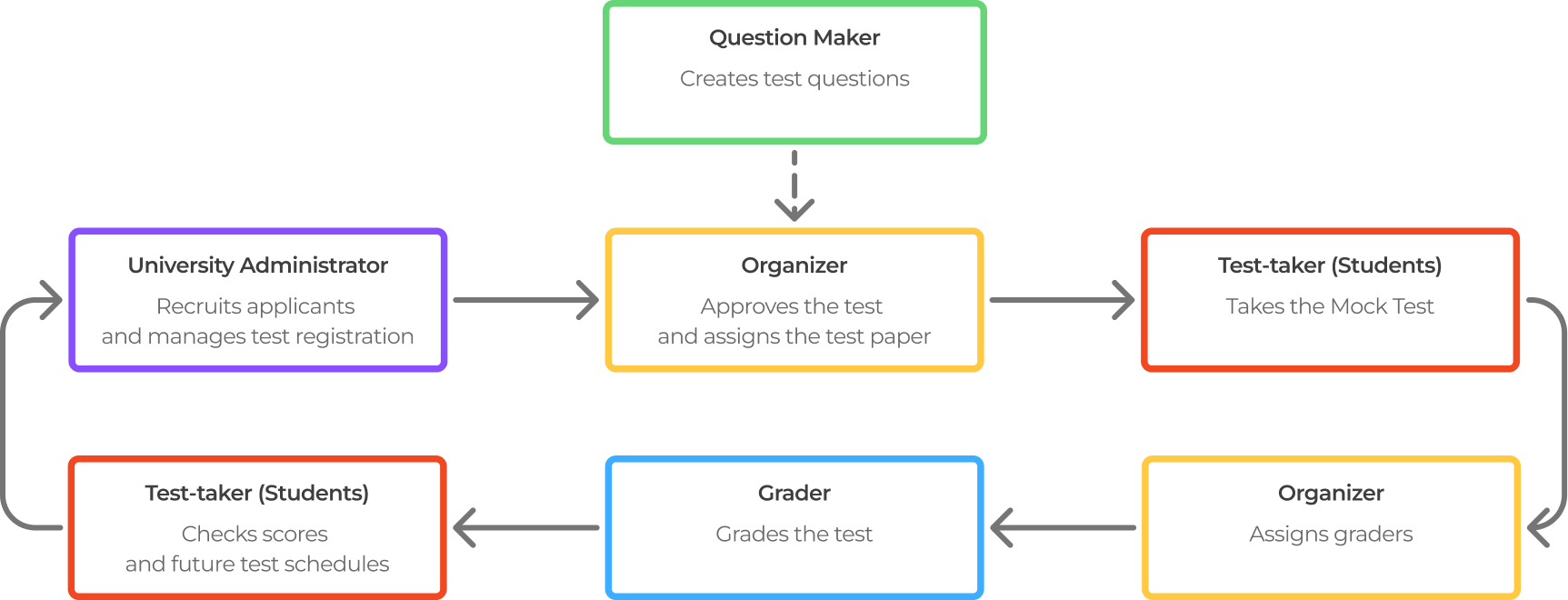
To manage this complexity, I first visualized the overall structure to clarify key challenges.
Detailed Workflow Diagram
Through discussions with the client, I analyzed each role’s workflow and behavior patterns.
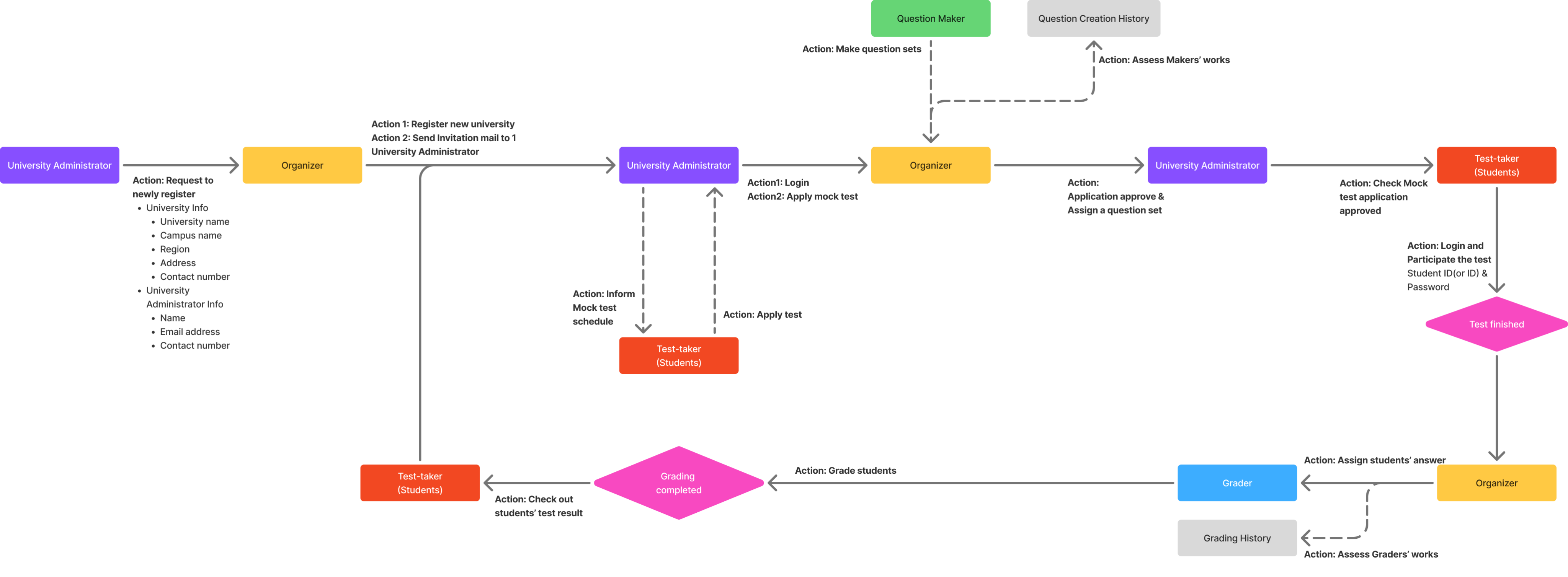
Finally, I applied LNB navigation patterns, consistent layout hierarchies, and visual grouping techniques to reduce cognitive load and enhance usability.
Mid-fi Wireframe
University Administrator - Applying New Mock Test Schedule
- Application: Allows intuitive setting of desired date, location, and level by university admins.
- Registration: Supports efficient bulk registration of examinees via CSV file upload.
- Management: The dashboard offers a filterable list of all scheduled and completed tests for efficient management.

Organizer - Test Application Management
- Alert System: A top-right notification function prevents organizers from missing new application submissions.
- Application List: Organizers easily access a list view of all university mock test applications.
- Step-by-Step Approval: Complex approval procedures (info check, list verification, email sending) are handled intuitively, step-by-step.
Grader - Grading Management
- Progress Tracking: Graders can intuitively monitor their progress, deadline, and completion rate to prevent any delays.
- Efficient Workflow: Designed an efficient flow where answers are grouped by question to maintain scoring momentum.
- Focused Scoring: The page is minimalist, excluding Examinee PII, to allow graders to focus solely on the subjective scoring task.
Question Maker - Question Management
- Optimized Flow: The complex input flow was optimized to accommodate the structure of various TOPIK question types.
- Detailed Input: Input elements are segmented into instructions, allocated scores, attachments, and options.
- Real-time Preview: A split-screen interface provides simultaneous data input and question preview to enhance efficiency.
Expected Impacts
University Administrator
By simplifying the test application and registration process, university admins can now set up mock tests independently without relying on external support.Bulk registration and an integrated management dashboard significantly reduce administrative workload and improve operational accuracy.
Organizer
The streamlined approval flow and alert system enable organizers to process multiple university applications more efficiently.They gain real-time visibility into application status and minimize communication errors, leading to faster coordination across institutions.
Grader
With clear progress tracking and a distraction-free scoring interface, graders experience reduced cognitive fatigue and improved scoring consistency.
The question-based grading flow also enhances focus and speed, ensuring timely completion of results.
Question Maker
An optimized input structure and real-time preview system allow question makers to create complex TOPIK items more efficiently.This reduces repetitive edits and ensures higher content quality, while providing immediate feedback throughout the creation process.
Period
May 2025 ~ Present
Role
UX Design Lead
Tool
Figma
Industry
Education
Please note that due to service copyright and security reasons, the actual service name and some content in this project have been modified.
Period
May 2025 ~ Present
Role
UX Design Lead
Tool
Figma
Industry
Education
Please note that due to service copyright and security reasons, the actual service name and some content in this project have been modified.
Project Overview
While students experience the mock test, administrators across universities and Mock test organization must handle mock test application, test question management, grading for test-takers, and even more.
I led the UX design for the admin ecosystem, building a structured platform for four distinct
Challenge
The admin page was designed for four different user roles —university administrators, organizers, question creators, and graders— all operating within the same system.
This multi-layered structure made the overall architecture highly complex, so the primary challenge was to create an interface that feels intuitive and seamlessly connected across roles.
Ideate
Workflow Diagram
To manage this complexity, I first visualized the overall structure to clarify key challenges.
Detailed Workflow Diagram
Through discussions with the client, I analyzed each role’s workflow and behavior patterns.
Finally, I applied LNB navigation patterns, consistent layout hierarchies, and visual grouping techniques to reduce cognitive load and enhance usability.
Mid-fi Wireframe
University Administrator - Applying New Mock Test Schedule
- Application: Allows intuitive setting of desired date, location, and level by university admins.
- Registration: Supports efficient bulk registration of examinees via CSV file upload.
- Management: The dashboard offers a filterable list of all scheduled and completed tests for efficient management.

Organizer - Test Application Management
- Alert System: A top-right notification function prevents organizers from missing new application submissions.
- Application List: Organizers easily access a list view of all university mock test applications.
- Step-by-Step Approval: Complex approval procedures (info check, list verification, email sending) are handled intuitively, step-by-step.
Grader - Grading Management
- Progress Tracking: Graders can intuitively monitor their progress, deadline, and completion rate to prevent any delays.
- Efficient Workflow: Designed an efficient flow where answers are grouped by question to maintain scoring momentum.
- Focused Scoring: The page is minimalist, excluding Examinee PII, to allow graders to focus solely on the subjective scoring task.
Question Maker - Question Management
- Optimized Flow: The complex input flow was optimized to accommodate the structure of various TOPIK question types.
- Detailed Input: Input elements are segmented into instructions, allocated scores, attachments, and options.
- Real-time Preview: A split-screen interface provides simultaneous data input and question preview to enhance efficiency.
Expected Impacts
University Administrator
By simplifying the test application and registration process, university admins can now set up mock tests independently without relying on external support.Bulk registration and an integrated management dashboard significantly reduce administrative workload and improve operational accuracy.
Organizer
The streamlined approval flow and alert system enable organizers to process multiple university applications more efficiently.
They gain real-time visibility into application status and minimize communication errors, leading to faster coordination across institutions.
Grader
With clear progress tracking and a distraction-free scoring interface, graders experience reduced cognitive fatigue and improved scoring consistency.The question-based grading flow also enhances focus and speed, ensuring timely completion of results.
Question Maker
An optimized input structure and real-time preview system allow question makers to create complex TOPIK items more efficiently.
This reduces repetitive edits and ensures higher content quality, while providing immediate feedback throughout the creation process.
Period
May 2025 ~ Present
Role
UX Design Lead
Tool
Figma
Industry
Education
Please note that due to service copyright and security reasons, the actual service name and some content in this project have been modified.
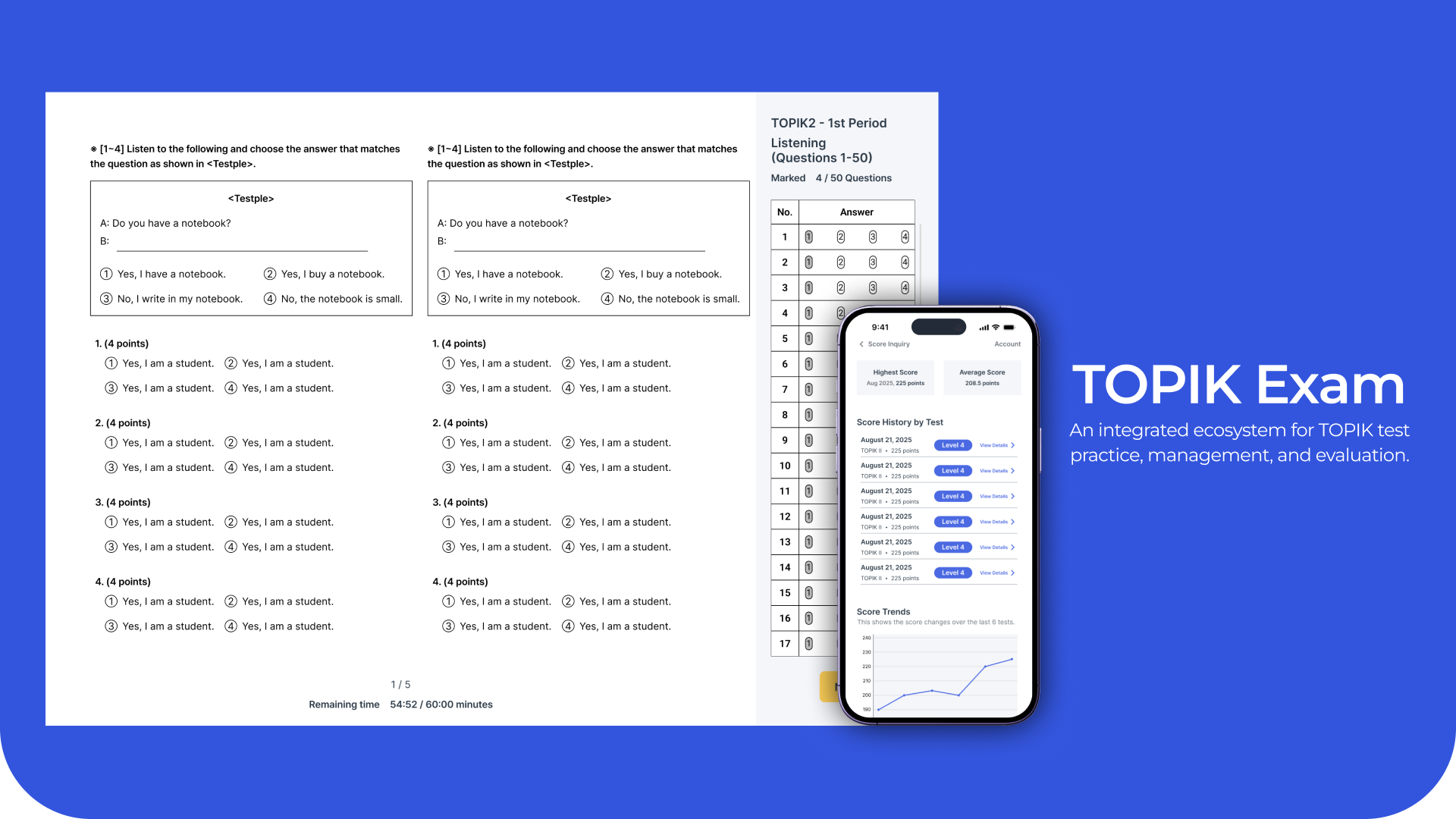
Project Overview
While students experience the mock test, administrators across universities and Mock test organization must handle mock test application, test question management, grading for test-takers, and even more.
I led the UX design for the admin ecosystem, building a structured platform for four distinct
Challenge
The admin page was designed for four different user roles —university administrators, organizers, question creators, and graders— all operating within the same system.
This multi-layered structure made the overall architecture highly complex, so the primary challenge was to create an interface that feels intuitive and seamlessly connected across roles.
Ideate
Workflow Diagram
To manage this complexity, I first visualized the overall structure to clarify key challenges.
Detailed Workflow Diagram
Through discussions with the client, I analyzed each role’s workflow and behavior patterns.
Finally, I applied LNB navigation patterns, consistent layout hierarchies, and visual grouping techniques to reduce cognitive load and enhance usability.
Mid-fi Wireframe
University Administrator - Applying New Mock Test Schedule
- Application: Allows intuitive setting of desired date, location, and level by university admins.
- Registration: Supports efficient bulk registration of examinees via CSV file upload.
- Management: The dashboard offers a filterable list of all scheduled and completed tests for efficient management.

Organizer - Test Application Management
- Alert System: A top-right notification function prevents organizers from missing new application submissions.
- Application List: Organizers easily access a list view of all university mock test applications.
- Step-by-Step Approval: Complex approval procedures (info check, list verification, email sending) are handled intuitively, step-by-step.
Grader - Grading Management
- Progress Tracking: Graders can intuitively monitor their progress, deadline, and completion rate to prevent any delays.
- Efficient Workflow: Designed an efficient flow where answers are grouped by question to maintain scoring momentum.
- Focused Scoring: The page is minimalist, excluding Examinee PII, to allow graders to focus solely on the subjective scoring task.
Question Maker - Question Management
- Optimized Flow: The complex input flow was optimized to accommodate the structure of various TOPIK question types.
- Detailed Input: Input elements are segmented into instructions, allocated scores, attachments, and options.
- Real-time Preview: A split-screen interface provides simultaneous data input and question preview to enhance efficiency.
Expected Impacts
University Administrator
By simplifying the test application and registration process, university admins can now set up mock tests independently without relying on external support.
Bulk registration and an integrated management dashboard significantly reduce administrative workload and improve operational accuracy.
Organizer
The streamlined approval flow and alert system enable organizers to process multiple university applications more efficiently.
They gain real-time visibility into application status and minimize communication errors, leading to faster coordination across institutions.
Grader
With clear progress tracking and a distraction-free scoring interface, graders experience reduced cognitive fatigue and improved scoring consistency.
The question-based grading flow also enhances focus and speed, ensuring timely completion of results.
Question Maker
An optimized input structure and real-time preview system allow question makers to create complex TOPIK items more efficiently.
This reduces repetitive edits and ensures higher content quality, while providing immediate feedback throughout the creation process.